Runcell
AI Agent for Jupyter Notebooks
Freemium
Support platforms
web
What is Runcell
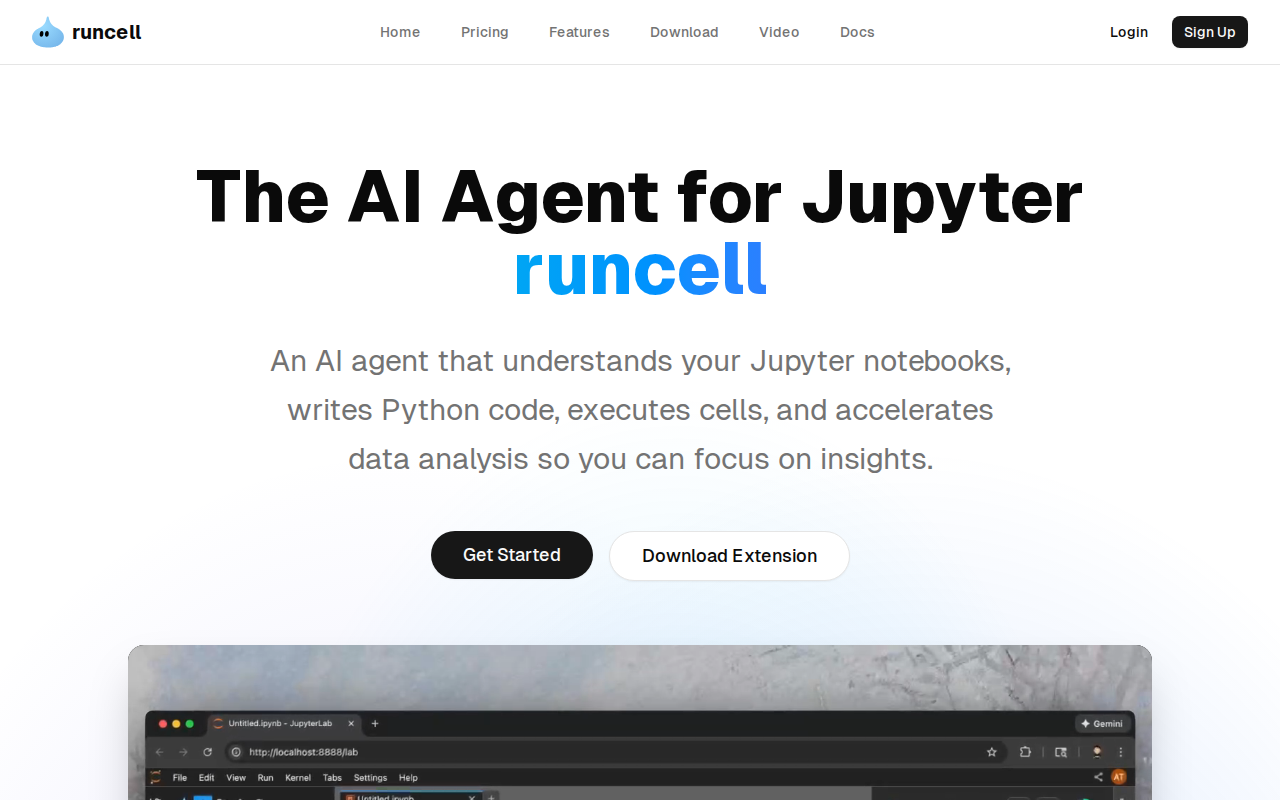
Runcell is an AI agent designed to enhance Jupyter Notebooks, streamlining data analysis and code generation. It understands notebook structure, suggests Python code, executes cells, and explains results in natural language. Unlike other tools, Runcell can interpret visualizations and image outputs, providing a more comprehensive understanding of your data. This tool uses a lightweight extension that integrates directly into your existing Jupyter workflow, eliminating the need for new IDEs or complex setups. Data scientists, researchers, and anyone working with Jupyter notebooks will benefit from Runcell's ability to automate repetitive tasks and accelerate insights.
Runcell 's Core features
AI-Powered Code Generation
Runcell analyzes your notebook's context and generates relevant Python code based on your natural language prompts. This feature leverages a fine-tuned language model to understand data structures, variable names, and desired outcomes, significantly reducing the time spent writing and debugging code. Compared to manual coding, this feature can reduce coding time by up to 60% for common data analysis tasks.
Interactive Learning Mode
Runcell offers an interactive learning mode that explains complex concepts with live examples. This mode is designed to help users understand the differences between algorithms like K-means and DBSCAN, providing immediate feedback and practical demonstrations. This feature is particularly useful for those new to data science or looking to deepen their understanding of specific techniques, accelerating the learning process.
Autonomous Agent Mode
The Autonomous Agent Mode allows Runcell to execute tasks with minimal user input. It can automatically generate code, execute cells, and interpret results based on high-level instructions. This mode is designed for users who want to automate repetitive tasks or quickly prototype data analysis workflows. This feature can automate up to 80% of routine data analysis tasks, freeing up users to focus on insights.
Visualization Understanding
Runcell can interpret visualizations and image outputs from your code, providing a more comprehensive understanding of your data. This feature allows the AI agent to understand the meaning behind charts and graphs, enabling it to provide more accurate and insightful explanations. This is a key differentiator from other AI tools that may only understand text-based outputs.
Continuous Context Awareness
Runcell continuously analyzes the surrounding context in your notebook, recommending the next best action. This feature suggests Python functions, updates imports, launches visualizations, or transforms outputs into publication-ready charts. This proactive approach ensures users stay focused on their analysis and reduces the need for manual intervention, improving workflow efficiency by up to 40%.
How to use Runcell
- Install the Runcell extension directly within your JupyterLab environment.,2. After installation, a 'Runcell' icon will appear in your JupyterLab interface.,3. Click the 'Get Started' button within the Runcell interface to begin.,4. Start by describing your desired task in natural language within a new cell.,5. Runcell will generate Python code; review and execute the code.,6. Analyze the results and use Runcell's explanations to understand the output and iterate.
Use cases of Runcell
Data Exploration
A data scientist uses Runcell to quickly explore a new dataset. They describe their goals in natural language, and Runcell generates code to load the data, perform initial analysis, and create visualizations. This allows them to identify key trends and patterns much faster than manual coding, saving hours of work.
Algorithm Comparison
A student uses Runcell's interactive learning mode to compare different clustering algorithms. They input their data, and Runcell explains the differences between K-means and DBSCAN, providing live examples and visualizations. This helps them understand the strengths and weaknesses of each algorithm in a practical, hands-on way.
Automated Reporting
A researcher uses Runcell to automate the creation of a data analysis report. They provide the raw data and high-level instructions, and Runcell generates the code, executes the analysis, creates visualizations, and explains the results in natural language, automating the entire reporting process.
Bioinformatics Visualization
A bioinformatician uses Runcell to visualize complex biological data. They input their data, and Runcell generates the necessary code to create publication-ready charts and graphs, allowing them to quickly communicate their findings to others. This streamlines the data visualization process, saving time and improving clarity.
Who benefits from Runcell
Data Scientists
Data scientists benefit from Runcell's ability to automate repetitive tasks, generate code, and interpret visualizations, allowing them to focus on insights and analysis rather than tedious coding. This significantly increases their productivity and efficiency in data-driven projects.
Researchers
Researchers can leverage Runcell to quickly explore data, create visualizations, and automate report generation. This helps them accelerate their research process, improve the clarity of their findings, and save valuable time on data analysis and presentation.
Students and Educators
Students and educators can use Runcell's interactive learning mode to understand complex data science concepts and algorithms. The tool provides live examples and explanations, making learning more engaging and effective, and helping to bridge the gap between theory and practice.
Data Analysts
Data analysts can use Runcell to streamline their workflow, automate repetitive tasks, and quickly generate insights from data. This improves their efficiency, reduces the time spent on manual coding, and allows them to focus on delivering valuable business insights.
Pricing of Runcell
Free to use extension. No pricing details are explicitly mentioned on the website.