Sniffnet: comfortably monitor your Internet traffic
Cross-platform network monitor
Free
Support platforms
web
What is Sniffnet: comfortably monitor your Internet traffic
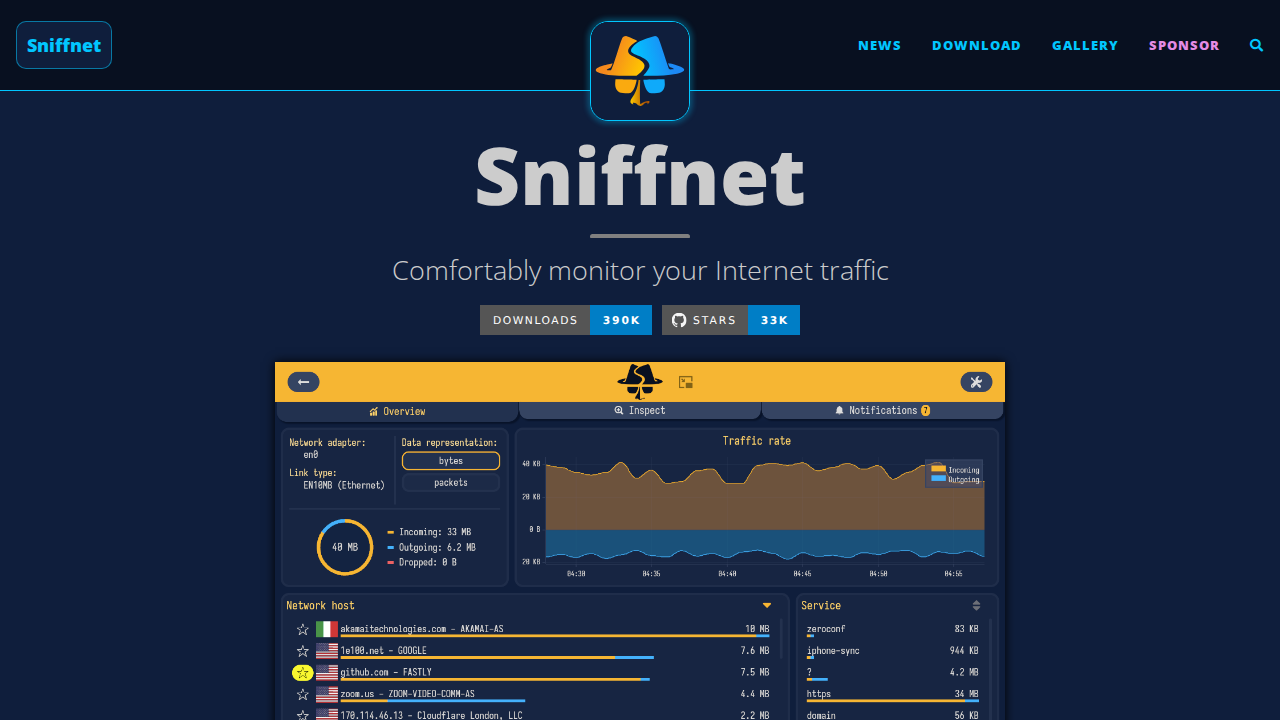
Sniffnet is a cross-platform network monitoring tool designed for intuitive and reliable traffic analysis. It allows users to easily track internet traffic, gather statistics, identify communication partners, and inspect network activity in detail. Unlike many complex network analyzers, Sniffnet prioritizes user experience, offering an approachable interface and 24 language support. Built with a security-first approach, it emphasizes data privacy and system integrity. Developed in Rust, Sniffnet is free and open-source, providing efficient and reliable performance for users seeking to understand and manage their network connections.
Sniffnet: comfortably monitor your Internet traffic 's Core features
Cross-Platform Compatibility
Sniffnet works seamlessly across Windows, macOS, and Linux, providing a consistent monitoring experience regardless of the user's operating system. This broad compatibility ensures that users can monitor their network traffic on any device without platform limitations, unlike tools restricted to specific operating systems. This is achieved through the use of the Rust programming language, which allows for cross-compilation.
Real-time Traffic Visualization
Sniffnet offers real-time charts that dynamically display traffic intensity, providing immediate insights into network activity. These charts update in real-time, allowing users to quickly identify spikes in traffic, potential bottlenecks, or unusual network behavior. The visualization includes both overall traffic and per-connection data, updating at a rate of up to 10 times per second.
Comprehensive Filtering Options
Users can apply a variety of filters to the observed traffic, allowing them to focus on specific aspects of their network activity. This includes filtering by protocol (e.g., TCP, UDP), IP address, port number, or even custom filters based on packet content. These filters help users narrow down the data displayed, making it easier to identify specific connections or analyze particular types of traffic.
Domain Name Resolution
Sniffnet automatically resolves IP addresses to domain names, making it easier for users to understand the destinations of their network traffic. This feature simplifies the process of identifying which websites or services a user is communicating with, providing a more user-friendly experience compared to tools that only display IP addresses. It uses DNS queries to resolve the IP addresses.
PCAP File Import/Export
Sniffnet supports importing and exporting network traffic data in PCAP (Packet Capture) format. This allows users to save comprehensive capture reports for later analysis or share them with others. The PCAP format is a standard for network traffic analysis, ensuring compatibility with other network analysis tools like Wireshark. The export includes all packet data captured during the monitoring session.
How to use Sniffnet: comfortably monitor your Internet traffic
- Download the Sniffnet application from the official website for your operating system (Windows, macOS, or Linux).,2. Launch Sniffnet and select the network adapter you wish to monitor from the available options.,3. Apply filters to the observed traffic to narrow down the data displayed, such as filtering by protocol or IP address.,4. View real-time charts and overall statistics to analyze traffic intensity and data exchange.,5. Explore connection details, including domain names and geographical locations of remote hosts.,6. Utilize features like PCAP file import/export for comprehensive capture reports and save favorite network hosts for quick access.
Use cases of Sniffnet: comfortably monitor your Internet traffic
Network Troubleshooting
Network administrators can use Sniffnet to diagnose network issues by monitoring traffic patterns, identifying bottlenecks, and pinpointing the source of connectivity problems. They can analyze real-time charts and filter traffic to isolate specific issues, such as high latency or packet loss, leading to faster resolution times.
Security Auditing
Security professionals can use Sniffnet to monitor network traffic for suspicious activity, such as unauthorized connections or data exfiltration attempts. They can inspect individual connections, identify potential threats, and analyze traffic patterns to detect malware or other malicious behavior, enhancing overall network security.
Application Performance Monitoring
Developers can use Sniffnet to monitor the network traffic generated by their applications, identifying performance bottlenecks and optimizing network communication. They can analyze traffic patterns, identify slow connections, and optimize data transfer, leading to improved application performance and user experience.
Privacy Awareness
Privacy-conscious users can use Sniffnet to understand which websites and services their devices are communicating with, and to identify potential privacy risks. They can monitor their network traffic, identify data exchange partners, and make informed decisions about their online activities, protecting their personal data.
Who benefits from Sniffnet: comfortably monitor your Internet traffic
Network Administrators
Network administrators need Sniffnet to monitor network traffic, diagnose connectivity issues, and ensure optimal network performance. They can use it to identify bottlenecks, troubleshoot problems, and maintain a secure and efficient network infrastructure.
Security Professionals
Security professionals require Sniffnet to monitor network traffic for suspicious activity, detect potential threats, and ensure the security of their network. They can use it to identify malware, unauthorized connections, and other security risks.
Developers
Developers benefit from Sniffnet by monitoring the network traffic generated by their applications, identifying performance bottlenecks, and optimizing network communication. They can analyze traffic patterns and improve application performance.
Privacy-Conscious Users
Privacy-conscious users need Sniffnet to understand which websites and services their devices are communicating with, and to identify potential privacy risks. They can monitor their network traffic and make informed decisions about their online activities.
Pricing of Sniffnet: comfortably monitor your Internet traffic
Free and open-source, dual-licensed under MIT or Apache-2.0. No paid plans or subscriptions.