Superset
BI web app for data exploration
Free
Support platforms
web
What is Superset
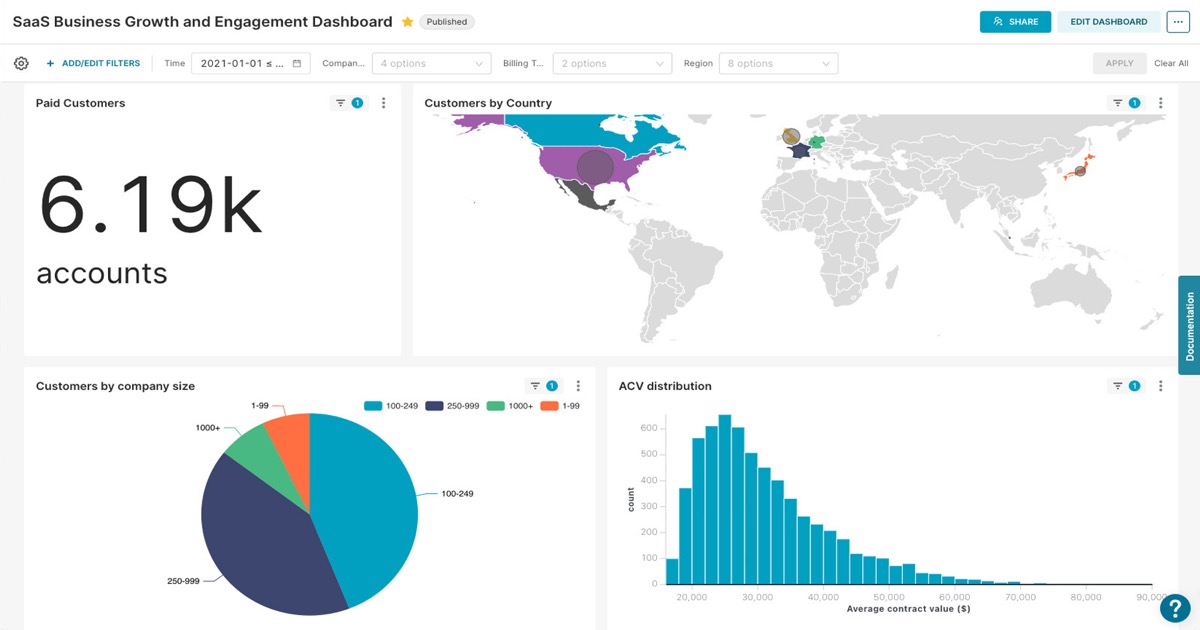
Apache Superset is a modern, open-source data exploration and visualization platform designed for business intelligence. It empowers users to create interactive dashboards and explore data through a user-friendly interface. Superset differentiates itself through its robust SQL IDE, extensive visualization options (40+ types), and a semantic layer for data modeling. Built with a focus on enterprise readiness, it offers role-based access control and a REST API for integration. It leverages a Python backend with a React frontend, utilizing technologies like Apache Druid for fast data aggregation. Data analysts, business users, and data engineers benefit from Superset's ability to quickly visualize and understand complex datasets, enabling data-driven decision-making.
Superset 's Core features
Interactive Dashboards
Superset allows users to build highly interactive dashboards with drag-and-drop functionality. Users can create dashboards with various chart types, filters, and controls. Dashboards can be easily shared and embedded. This feature allows for real-time data exploration and provides a centralized view of key business metrics, improving decision-making speed and data accessibility.
SQL IDE with Auto-complete
The built-in SQL IDE provides a powerful environment for writing and executing SQL queries. It features auto-completion, syntax highlighting, and query history. This feature enables data analysts and engineers to quickly explore data, create custom visualizations, and troubleshoot data issues. The IDE supports various SQL dialects, making it compatible with a wide range of databases.
Extensive Visualization Types
Superset offers over 40 different visualization types, including charts, graphs, and maps. Users can choose the best visualization for their data and insights. The variety of visualization options allows users to represent data in a clear and understandable way. This feature supports diverse data analysis needs and enhances the ability to communicate findings effectively.
Semantic Layer for Data Modeling
Superset includes a semantic layer that allows users to define and manage data models. Users can define metrics, dimensions, and calculated fields. This feature simplifies data exploration and ensures consistency across dashboards. The semantic layer provides a unified view of the data, making it easier for business users to understand and analyze data without needing to know the underlying database structure.
Role-Based Access Control
Superset provides role-based access control (RBAC) to manage user permissions and data security. Administrators can define roles and assign permissions to control access to dashboards, datasets, and features. This feature ensures that sensitive data is protected and that users only have access to the information they need. RBAC supports compliance with data governance policies.
REST API for Integration
Superset offers a REST API that allows for integration with other applications and systems. Users can programmatically access and manage dashboards, datasets, and users. This feature enables automation and integration with existing workflows. The API supports various operations, including data import, dashboard creation, and user management, enhancing the platform's flexibility.
How to use Superset
- Installation: Choose your preferred method (Docker, Kubernetes, or manual installation using Python's
pip). Docker is recommended for ease of setup. - Database Connection: Configure database connections within Superset, specifying connection details (host, port, username, password) for your data sources (e.g., PostgreSQL, MySQL, Snowflake).
- Data Exploration: Navigate to the 'Datasets' section and select a table. Use the SQL Lab to write and execute SQL queries to explore your data.
- Visualization Creation: Create charts by selecting a dataset, choosing a visualization type, and configuring the necessary dimensions and metrics.
- Dashboard Design: Assemble charts into interactive dashboards, customizing layouts, adding filters, and setting up dashboard-level interactions.
- User Management: Manage user roles and permissions to control access to dashboards and data, ensuring data security and compliance.
Use cases of Superset
Sales Performance Analysis
Sales teams use Superset to monitor key performance indicators (KPIs) like revenue, sales volume, and customer acquisition cost. They create dashboards to track sales trends, identify top-performing products, and analyze sales rep performance. This helps them make data-driven decisions to optimize sales strategies and improve revenue.
Marketing Campaign Tracking
Marketing teams utilize Superset to track the performance of marketing campaigns. They create dashboards to monitor website traffic, conversion rates, and return on ad spend (ROAS). This allows them to assess campaign effectiveness, identify areas for improvement, and optimize marketing spend for better results.
Financial Reporting
Finance departments use Superset to generate financial reports and track key financial metrics. They create dashboards to visualize revenue, expenses, and profitability. This helps them monitor financial performance, identify trends, and make informed financial decisions. They can also create reports for stakeholders.
Product Analytics
Product managers use Superset to analyze user behavior and product performance. They create dashboards to track user engagement, feature usage, and conversion rates. This helps them understand how users interact with the product, identify areas for improvement, and make data-driven decisions to enhance the user experience.
Who benefits from Superset
Data Analysts
Data analysts need Superset to explore data, create visualizations, and build interactive dashboards. They use the SQL IDE to query data and the various chart types to present their findings. Superset streamlines their workflow and enables them to derive insights from data quickly.
Business Users
Business users benefit from Superset's user-friendly interface and interactive dashboards. They can easily access and understand key business metrics without needing to write SQL queries. Superset empowers them to make data-driven decisions and monitor performance.
Data Engineers
Data engineers use Superset to connect to various data sources and manage data pipelines. They can use the SQL IDE to validate data and create custom visualizations. Superset helps them ensure data quality and provide a reliable platform for data exploration and analysis.
Data Scientists
Data scientists can leverage Superset to visualize the results of their models and share insights with stakeholders. They can connect to various data sources, create custom visualizations, and build interactive dashboards. Superset helps them communicate their findings effectively.
Pricing of Superset
Apache Superset is open-source and free to use under the Apache 2.0 license. There are no associated costs for the software itself.