webpack
JavaScript module bundler
Free
Support platforms
web
What is webpack
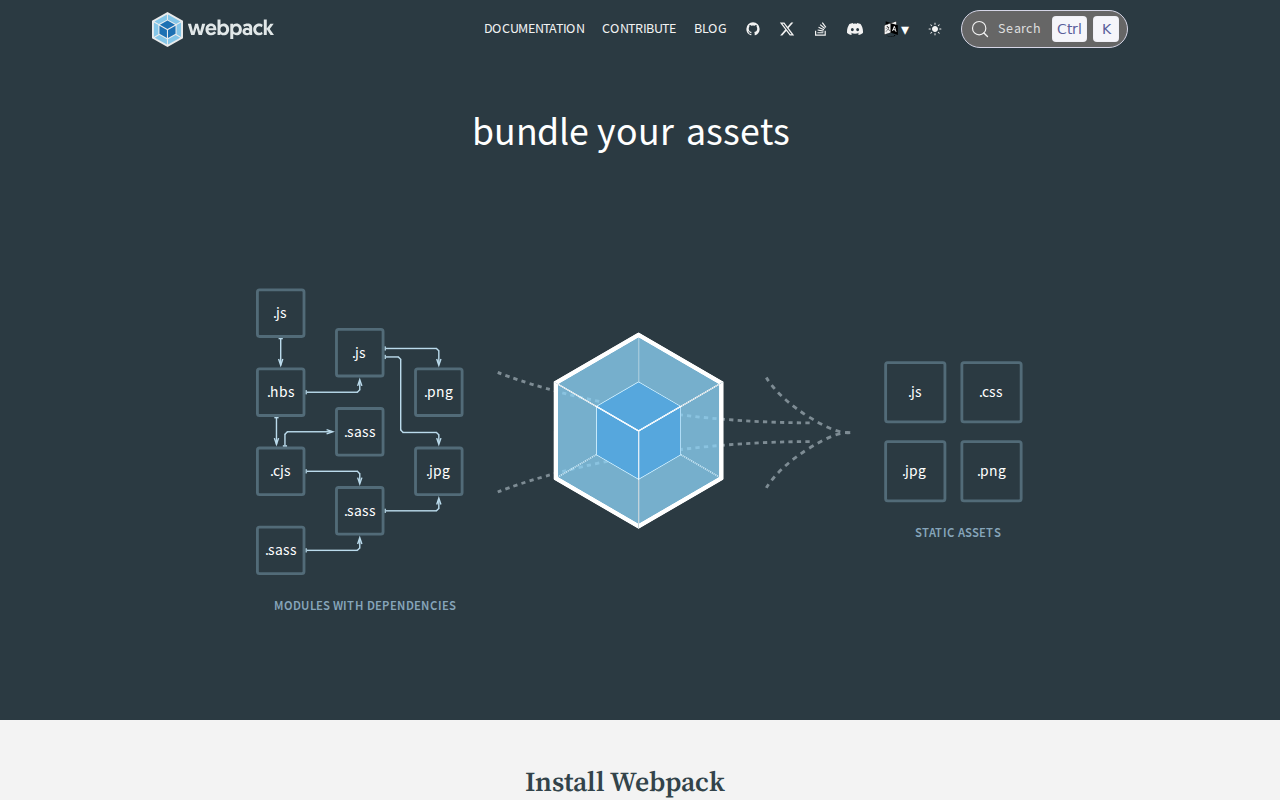
webpack is a powerful open-source JavaScript module bundler. It takes modules with dependencies and generates static assets representing those modules. Its core value lies in simplifying complex web application development by managing dependencies, optimizing assets, and enabling code splitting. Unlike simpler task runners, webpack focuses on dependency graphs and asset management, offering advanced features like code splitting, hot module replacement, and various loaders for different file types. This makes it unique in its ability to handle large-scale projects and complex build processes. Developers building single-page applications (SPAs), progressive web apps (PWAs), or any JavaScript-heavy front-end project benefit most from webpack's capabilities, improving development efficiency and application performance.
webpack 's Core features
Module Bundling
Webpack bundles JavaScript modules and their dependencies into a single file or multiple files, optimizing the loading process for web browsers. This reduces the number of HTTP requests, improving page load times. It supports various module formats like CommonJS, AMD, and ES modules, ensuring compatibility across different JavaScript environments.
Code Splitting
Webpack allows splitting your code into smaller chunks, which can be loaded on demand. This significantly reduces the initial load time of your application by only loading the necessary code. Code splitting can be configured based on routes, user interactions, or other criteria, enhancing performance and user experience.
Asset Management
Webpack handles various asset types beyond JavaScript, including CSS, images, fonts, and more. Through loaders and plugins, it can process, optimize, and bundle these assets, such as minifying CSS, compressing images, and inlining small assets to reduce HTTP requests. This streamlines the build process.
Loaders and Plugins
Loaders transform different file types into modules that webpack can understand. Plugins extend webpack's capabilities, allowing for tasks like code minification, environment variable injection, and more. This modular architecture provides flexibility and customization for complex build processes. Examples include Babel for transpiling JavaScript and CSS loaders for styling.
Hot Module Replacement (HMR)
HMR allows developers to update modules in a running application without a full page reload. This significantly speeds up the development workflow by providing instant feedback on code changes. HMR maintains the application's state, preserving the user's current context during development.
Configuration Flexibility
Webpack offers extensive configuration options through the `webpack.config.js` file. Developers can customize the build process to meet specific project requirements, including defining entry points, output paths, loaders, plugins, and optimization strategies. This flexibility makes webpack adaptable to diverse project structures and needs.
How to use webpack
- Install webpack and the webpack CLI:
npm install --save-dev webpack webpack-cli.,2. Create a source file (e.g.,src/index.js) and import dependencies.,3. Create awebpack.config.jsfile in your project root to configure webpack.,4. Define anentrypoint (e.g.,./src/index.js) and anoutputpath (e.g.,./dist/bundle.js).,5. Run webpack from the command line:npx webpackto bundle your assets.,6. Include the generated bundle in your HTML file:<script src="dist/bundle.js"></script>.
Use cases of webpack
Single-Page Application (SPA) Development
Developers building SPAs use webpack to bundle JavaScript, CSS, and other assets, optimizing the application for fast loading and efficient performance. Webpack's code splitting feature allows for lazy loading of modules, improving initial load times and user experience.
Progressive Web App (PWA) Creation
Webpack is used to bundle and optimize assets for PWAs, enabling features like offline access and improved performance. Developers leverage webpack's capabilities to create service workers, cache assets, and ensure a seamless user experience across different devices and network conditions.
Modern JavaScript Framework Integration
Developers working with frameworks like React, Angular, and Vue.js use webpack to manage dependencies, transpile code, and optimize assets. Webpack integrates seamlessly with these frameworks, providing a robust build process and enabling features like hot module replacement.
Large-Scale Web Application Projects
Teams building complex web applications with numerous modules and dependencies rely on webpack to manage the build process efficiently. Webpack's advanced features, such as code splitting and asset optimization, help maintain performance and scalability as the project grows.
Who benefits from webpack
Front-End Developers
Front-end developers benefit from webpack's ability to streamline the build process, manage dependencies, and optimize assets, leading to faster development cycles and improved application performance. It simplifies complex tasks like code splitting and asset management.
Web Application Architects
Web application architects utilize webpack to design and implement efficient build processes for large-scale projects. They leverage webpack's configuration options and plugin ecosystem to create scalable and maintainable applications.
JavaScript Framework Users
Developers using JavaScript frameworks like React, Angular, and Vue.js rely on webpack to bundle and optimize their applications. Webpack integrates seamlessly with these frameworks, providing a robust build process and enabling features like hot module replacement.
Web Developers focused on Performance
Web developers prioritizing website performance use webpack to optimize their assets, reduce load times, and improve user experience. Features like code splitting and asset minification help achieve faster page load speeds and better SEO.
Pricing of webpack
Open Source (MIT License). Donations accepted. No specific pricing plans are mentioned.