Cherry Studio
Multi-Model AI Desktop Client
Free
Support platforms
web
What is Cherry Studio
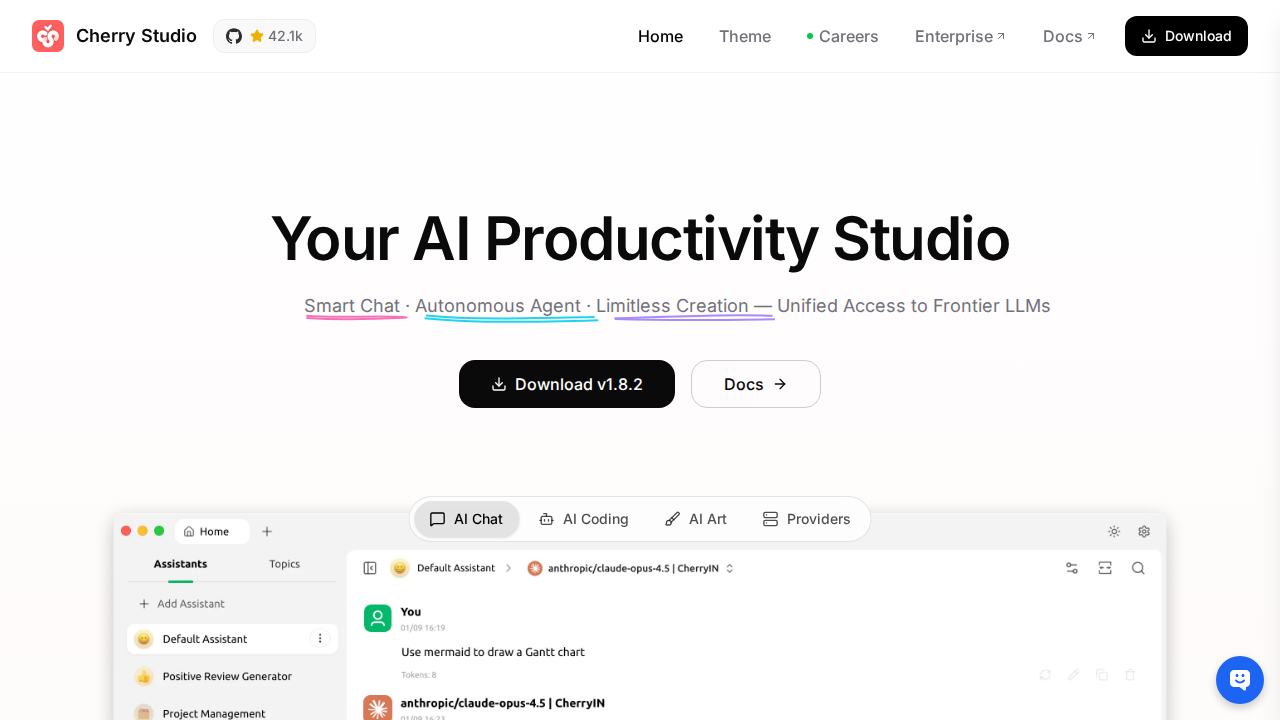
Cherry Studio is a desktop application offering a comprehensive AI experience by integrating over 300 AI models from various providers. It provides a unified interface for AI conversations, knowledge base management, image generation, and translation, supporting platforms like Windows, macOS, and Linux. Unlike web-based AI tools, Cherry Studio offers local model support (Ollama, LM Studio), ensuring data privacy and potentially lower latency. Its open-source nature and free availability make it accessible to a wide audience, from individual users to developers seeking a versatile AI toolkit. The application's focus on multi-model support and local processing sets it apart, providing users with flexibility and control over their AI interactions.
Cherry Studio 's Core features
300+ Integrated AI Models
Cherry Studio provides access to a vast library of over 300 AI models from various providers, including OpenAI, Claude, and Gemini. This extensive selection allows users to experiment with different models for diverse tasks, such as text generation, image creation, and code completion, all within a single application. The integration simplifies the process of switching between models and comparing results.
Multi-Platform Support
The application supports Windows, macOS, and Linux, ensuring broad accessibility across different operating systems. This cross-platform compatibility allows users to utilize Cherry Studio on their preferred devices, whether they are using a desktop, laptop, or other compatible hardware. The consistent user experience across platforms streamlines workflow.
Local Model Support
Cherry Studio integrates with local AI model environments like Ollama and LM Studio. This feature allows users to run AI models directly on their devices, enhancing data privacy and potentially reducing latency compared to cloud-based services. Users can leverage their local hardware resources for AI tasks, offering greater control and flexibility.
AI Conversation & Knowledge Base
Offers robust AI conversation capabilities and knowledge base integration. Users can engage in interactive dialogues with AI models, ask questions, and receive detailed responses. The knowledge base feature enables users to upload and manage documents, allowing the AI to access and utilize this information for more informed and relevant responses.
AI Image Generation & Translation
Includes built-in AI image generation and translation tools. Users can generate images from text prompts using various AI models, and translate text between multiple languages. These features enhance the application's versatility, making it a comprehensive tool for creative and communication-related tasks.
How to use Cherry Studio
- Download the Cherry Studio application from the official website (https://cherry-ai.com/download) for your operating system (Windows, macOS, or Linux).,2. Install the downloaded application following the standard installation procedure for your operating system.,3. Launch Cherry Studio after installation. The application will open with a user-friendly interface.,4. Explore the available AI models and services within the application. You can browse and select from the integrated 300+ models.,5. Begin using the AI features, such as AI conversations, knowledge base access, image generation, and translation, based on your selected model and task.,6. For local model usage, ensure you have Ollama or LM Studio installed and configured. Cherry Studio will automatically detect and integrate these local models.
Use cases of Cherry Studio
Content Creators
Content creators can use Cherry Studio to generate creative content such as blog posts, social media updates, and marketing copy. They can leverage the AI models for text generation, image creation, and translation, streamlining their content creation workflow and improving productivity. This allows them to produce more content in less time.
Researchers
Researchers can utilize Cherry Studio for literature review, data analysis, and report writing. They can use the AI conversation feature to summarize research papers, extract key information, and generate insights. The knowledge base feature allows them to organize and analyze large datasets, improving research efficiency.
Developers
Developers can use Cherry Studio for code generation, debugging, and documentation. They can leverage the AI models to write code, identify errors, and generate documentation. The application's support for local models allows developers to experiment with different AI models without relying on cloud services, enhancing privacy and control.
Students
Students can use Cherry Studio for academic research, essay writing, and language learning. They can use the AI conversation feature to ask questions, summarize information, and generate ideas. The translation feature helps them understand and translate foreign languages, improving their learning experience.
Who benefits from Cherry Studio
Content Creators
Content creators need Cherry Studio to generate diverse content formats quickly and efficiently. The AI-powered features for text generation, image creation, and translation streamline their workflow, allowing them to produce more content with less effort and time.
Researchers and Academics
Researchers benefit from Cherry Studio's ability to summarize complex information, analyze data, and assist with report writing. The AI-powered tools help them manage large datasets, extract key insights, and improve the efficiency of their research processes.
Developers and Tech Enthusiasts
Developers and tech enthusiasts can leverage Cherry Studio for code generation, debugging, and experimentation with various AI models. The support for local models and open-source nature provides them with flexibility, control, and the ability to customize the application to their needs.
Students and Educators
Students and educators can use Cherry Studio for research, writing, and language learning. The AI-powered features assist with summarizing information, generating ideas, and translating languages, enhancing the learning experience and improving academic performance.
Pricing of Cherry Studio
Free and open-source (MIT License). No paid plans are mentioned in the provided content.