mkcert
Simple, cross-platform local CA
Free
Support platforms
web
What is mkcert
mkcert is a straightforward command-line tool designed to create and install locally trusted certificates for development purposes. It simplifies the process of setting up HTTPS on local development environments by automating certificate generation and trust configuration. Unlike manual certificate creation, mkcert handles the complexities of cross-platform compatibility, ensuring certificates are trusted by your operating system and browsers. This tool is ideal for developers who need to test web applications securely with HTTPS without the hassle of purchasing or managing production certificates. It leverages the local certificate store, making it a secure and convenient solution for local development.
mkcert 's Core features
Cross-Platform Compatibility
mkcert works seamlessly across macOS, Linux, and Windows, ensuring a consistent experience regardless of your development environment. It automatically detects the correct trust store location and installation method for each operating system, saving developers from platform-specific configuration headaches. This eliminates the need for manual configuration and ensures certificates are trusted by all major browsers.
Simplified Certificate Generation
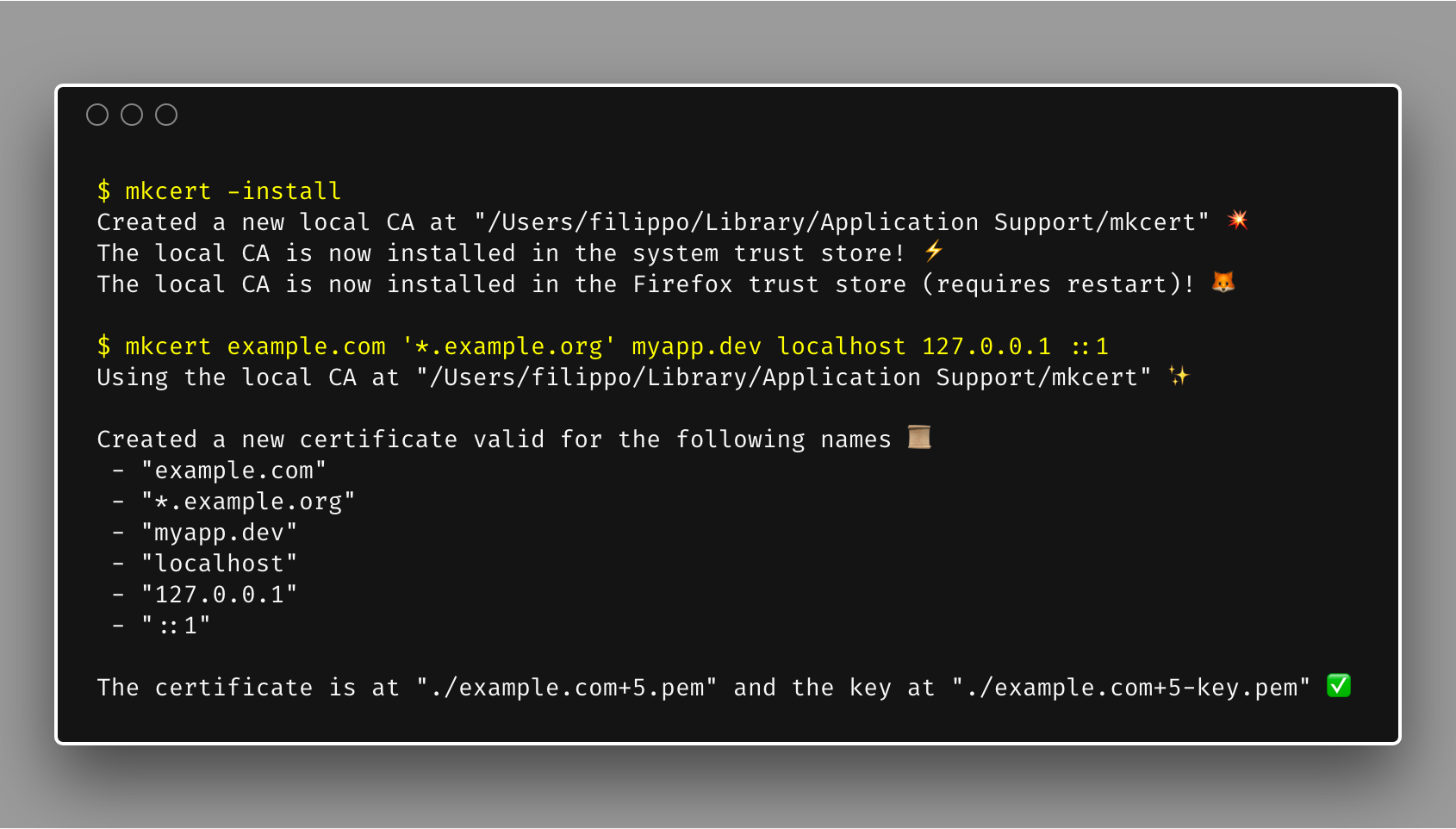
With a single command (`mkcert example.com`), you can generate a trusted certificate for your domain or IP address. mkcert handles the complexities of certificate signing, key generation, and proper configuration, reducing the time spent on setup from hours to minutes. This streamlined approach allows developers to focus on coding rather than certificate management.
Local Certificate Authority
mkcert creates its own local Certificate Authority (CA), which it then uses to sign certificates. This means that the certificates generated are trusted by your system without the need for external CAs or complex configurations. The local CA is stored securely, and certificates are automatically trusted by your browser and other applications.
Automated Trust Installation
The `-install` command automatically installs the generated CA certificate into your system's trust store. This ensures that all certificates generated by mkcert are trusted by your browser and other applications without manual configuration. This automation is a key time-saver, eliminating the need to manually configure trust settings in each browser or application.
Easy Certificate Revocation
While not explicitly mentioned, the nature of local CA's allows for easy revocation by simply removing the CA certificate from the trust store. This is a crucial feature for security, allowing developers to quickly invalidate certificates if they are compromised or no longer needed. This process is typically handled through the operating system's certificate management tools.
How to use mkcert
- Install mkcert: Use your system's package manager (e.g.,
brew install mkcerton macOS,apt install mkcerton Debian/Ubuntu, orchoco install mkcerton Windows).,2. Install the local CA: Runmkcert -installto install the generated CA certificate into your system's trust store. This step is crucial for browsers to trust the certificates generated by mkcert.,3. Generate a certificate: Navigate to your project directory and runmkcert example.com localhost 127.0.0.1 ::1(replace with your domain/IP). This creates a certificate and key.,4. Configure your web server: Point your web server (e.g., Apache, Nginx, or a development server) to use the generated certificate and key files.,5. Test your setup: Access your site via HTTPS (e.g.,https://localhost). Your browser should now trust the certificate, and you should see a secure connection.,6. Clean up (optional): To remove the CA, runmkcert -uninstall.
Use cases of mkcert
Local Web Development
Web developers use mkcert to test websites and web applications locally with HTTPS. They generate certificates for `localhost` or specific domain names, enabling secure testing of features like secure cookies, API calls, and other HTTPS-dependent functionalities. This ensures that the local development environment mirrors the production environment as closely as possible.
API Testing
Developers testing APIs that require HTTPS can use mkcert to create trusted certificates for their local testing servers. This allows them to make secure API calls and verify the correct functioning of their applications, including handling of SSL/TLS certificates and secure data transfer. This is especially useful when testing integrations with third-party services.
Dockerized Development Environments
Developers using Docker can integrate mkcert to generate certificates for their containerized applications. This allows them to run HTTPS-enabled services within Docker containers and test them securely. The certificates can be mounted into the containers, enabling secure communication between services and with the outside world.
Testing WebSockets
Developers working with WebSockets can utilize mkcert to create certificates for secure WebSocket connections (WSS). This allows them to test real-time applications locally, ensuring that the WebSocket connections are encrypted and secure. This is crucial for applications that require secure, bi-directional communication.
Who benefits from mkcert
Web Developers
Web developers are the primary beneficiaries, as mkcert simplifies the process of setting up HTTPS for local development. It saves them time and effort by automating certificate generation and trust configuration, allowing them to focus on coding and testing their applications securely.
API Developers
API developers benefit from mkcert by enabling secure testing of their APIs locally. They can easily generate trusted certificates for their local testing servers, allowing them to verify the correct functioning of their APIs, including handling of SSL/TLS certificates and secure data transfer.
DevOps Engineers
DevOps engineers can use mkcert to create secure development environments, including those using Docker or other containerization technologies. This ensures that all services within the environment can communicate securely, and that the development environment mirrors the production environment as closely as possible.
Security Testers
Security testers can use mkcert to create and test secure connections locally. They can generate certificates for testing the security of web applications and APIs, including testing for vulnerabilities related to SSL/TLS configuration and certificate validation.
Pricing of mkcert
Open Source (MIT License). Free to use.