fish shell
Smart, user-friendly command line shell
Free
Support platforms
web
What is fish shell
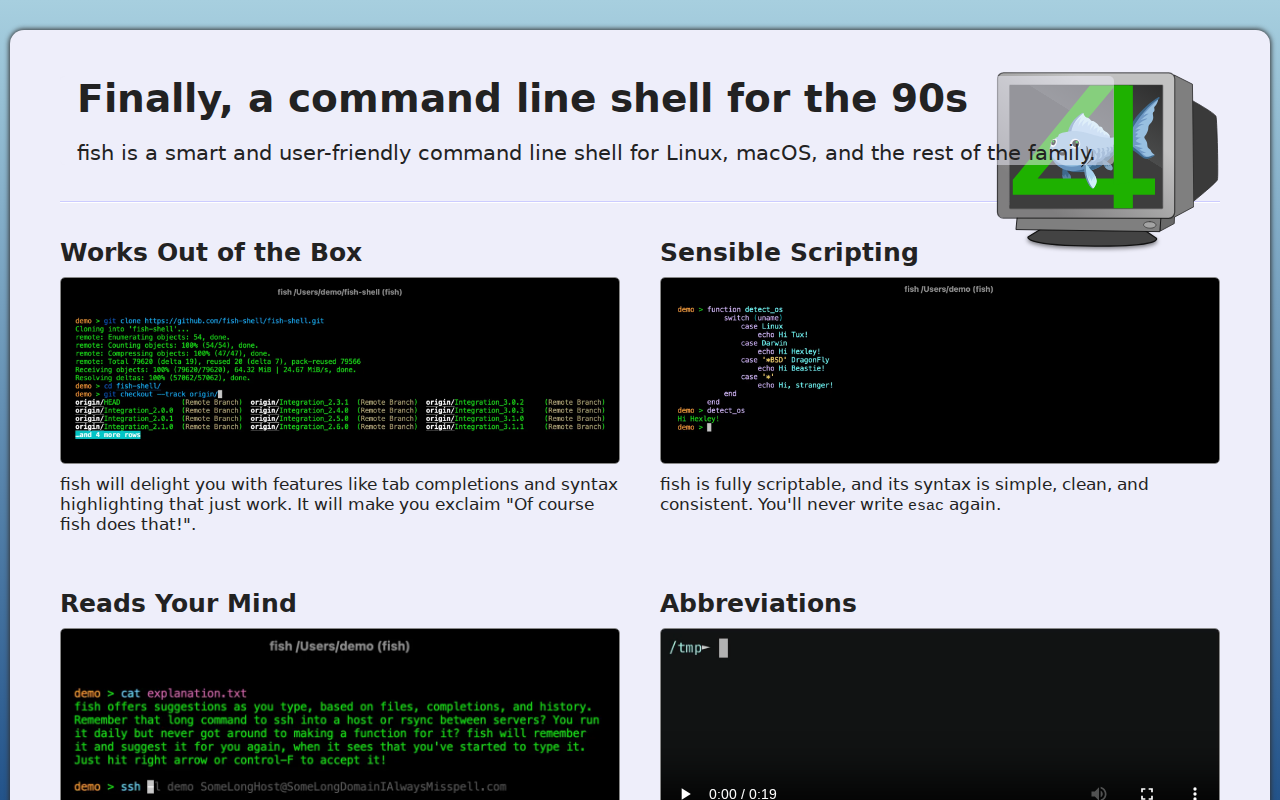
fish is a smart and user-friendly command line shell designed for Linux, macOS, and other Unix-like systems. Its core value proposition lies in enhancing the command-line experience with features that 'just work' out of the box, such as intelligent tab completion, syntax highlighting, and suggestions based on history and context. Unlike traditional shells like Bash or Zsh, fish prioritizes ease of use and a clean, consistent scripting language, eliminating the need for complex configuration files. It uses a web-based configuration interface for customization and supports 24-bit true color for a visually appealing terminal experience. Developers and system administrators benefit most from fish's intuitive design, which streamlines command execution and scripting, boosting productivity and reducing the learning curve associated with more complex shells.
fish shell 's Core features
Intelligent Tab Completion
Fish provides context-aware tab completion, suggesting commands, filenames, and arguments as you type. This feature learns from your history and the current directory, significantly reducing typing errors and improving efficiency. It dynamically updates suggestions, making it superior to basic completion systems found in older shells. For example, typing `git checkout <Tab>` will list available branches.
Syntax Highlighting
Fish automatically highlights commands, arguments, and other elements in the terminal, making it easier to read and understand your commands. This visual feedback helps identify syntax errors and improves overall readability. The highlighting is customizable through the web configuration, allowing users to tailor the appearance to their preferences. This is a significant improvement over shells without built-in syntax highlighting.
Web-Based Configuration
Fish offers a web-based configuration interface accessible by typing `fish_config` in the terminal. This allows users to easily customize colors, functions, variables, and history settings through a graphical interface. This is a user-friendly alternative to manually editing configuration files, making it accessible to users of all skill levels. The interface updates in real-time.
Sensible Scripting
Fish features a scripting language designed for simplicity and consistency, avoiding the complexities of other shells. Its syntax is straightforward, making it easier to write and maintain scripts. The elimination of constructs like `esac` and the use of more intuitive commands contribute to a cleaner and more readable scripting experience, reducing the learning curve.
Command Suggestions
Fish anticipates your needs by suggesting commands as you type, drawing from your command history and available completions. This proactive approach helps users discover commands and reduces the need to remember exact syntax. The suggestions are displayed in a non-intrusive manner, allowing users to quickly accept or ignore them.
How to use fish shell
- Installation: Choose your operating system and use the appropriate package manager. For example, on macOS, use
brew install fishor on Debian/Ubuntu, usesudo apt install fish.,2. Set as Default Shell (Optional): To make fish your default shell, use thechsh -s /usr/local/bin/fishcommand (adjust the path if necessary) and then log out and log back in.,3. Explore Tab Completion: Start typing a command and press the Tab key. Fish will suggest completions based on your history and available commands.,4. Customize with Web Interface: Open your web browser and typefish_configin the terminal to access the web-based configuration interface. Here, you can customize colors, functions, and variables.,5. Learn the Scripting Language: Familiarize yourself with fish's scripting syntax, which is designed to be simple and consistent. Refer to the documentation for examples and best practices.,6. Use Abbreviations: Create abbreviations for frequently used commands to save time. For example,abbr la 'ls -la'.
Use cases of fish shell
Software Development
Developers use fish to streamline their command-line workflows. They benefit from intelligent tab completion, syntax highlighting, and command suggestions, which reduce errors and speed up the coding process. For example, a developer can quickly navigate directories, run build commands, and manage Git repositories with greater efficiency.
System Administration
System administrators leverage fish to manage servers and perform system maintenance tasks. The shell's ease of use and scripting capabilities simplify complex tasks. For instance, an admin can automate routine tasks, monitor system resources, and troubleshoot issues more effectively using fish's intuitive interface and scripting language.
Data Science and Analysis
Data scientists and analysts utilize fish to interact with data and run analysis tools. The shell's features, such as tab completion and syntax highlighting, help them quickly execute commands and manage data files. For example, they can easily run Python scripts, manage datasets, and visualize results within the terminal.
General Command-Line Users
Users of all skill levels, from beginners to experienced users, can benefit from fish's user-friendly design. The shell's intuitive features, such as command suggestions and web-based configuration, make it easier to learn and use the command line. This allows users to perform everyday tasks more efficiently.
Who benefits from fish shell
Software Developers
Developers need a shell that enhances productivity and reduces errors. Fish's intelligent tab completion, syntax highlighting, and scripting capabilities streamline coding workflows, allowing developers to focus on writing code rather than struggling with the command line.
System Administrators
System administrators require a reliable and efficient shell for managing servers and performing system maintenance. Fish's ease of use, combined with its powerful scripting language, simplifies complex tasks and improves overall system administration efficiency.
Data Scientists
Data scientists benefit from a shell that facilitates data analysis and manipulation. Fish's features, such as tab completion and command suggestions, help them quickly execute commands and manage data files, accelerating their workflow.
Linux/macOS Users
Users who want a more user-friendly and feature-rich command-line experience. Fish offers a modern and intuitive interface, making it easier to learn and use the command line, regardless of their technical expertise.
Pricing of fish shell
Open Source (BSD 2-Clause License). Free to use, modify, and distribute. No paid plans or tiers.