GitHub
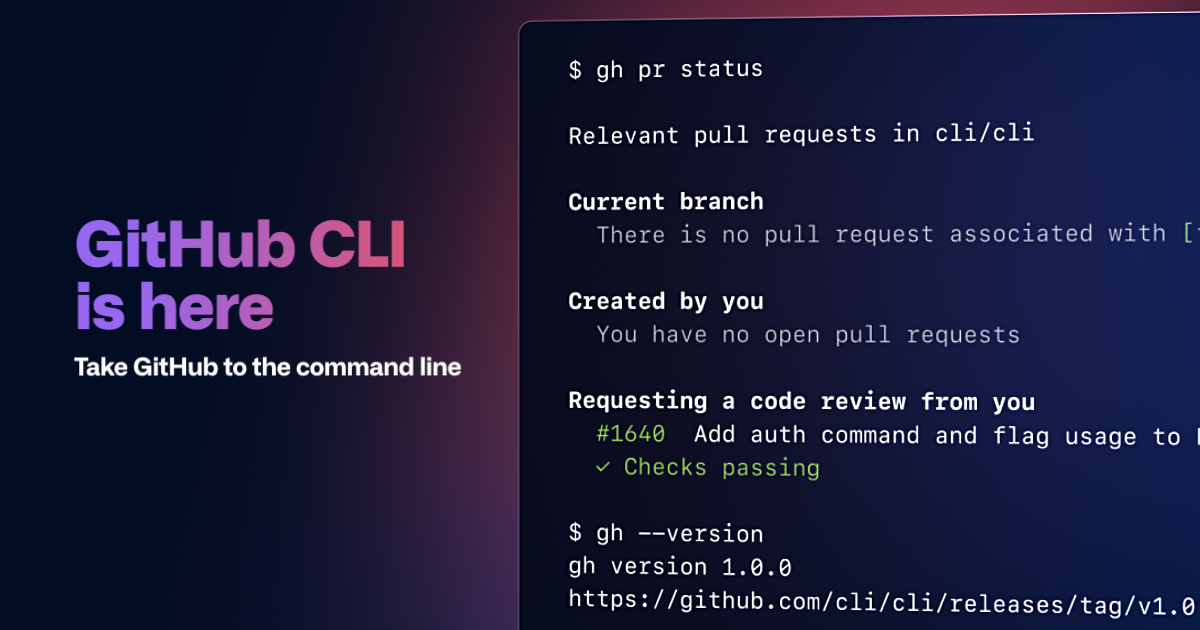
GitHub in your terminal.
Free
Support platforms
web
What is GitHub
GitHub CLI brings the power of GitHub directly to your command line, streamlining your workflow and enhancing productivity. It allows developers to interact with GitHub repositories, manage pull requests, issues, releases, and more, all without leaving the terminal. Unlike using the web interface, GitHub CLI offers faster navigation, automation capabilities through scripting, and seamless integration with existing development environments. It leverages the GitHub API to provide a consistent and efficient experience. This tool is ideal for developers, DevOps engineers, and anyone who frequently interacts with GitHub repositories, offering a more efficient and integrated development experience.
GitHub 's Core features
Command-Line Interface
Provides a command-line interface for interacting with GitHub, allowing developers to perform actions like creating pull requests, listing issues, and managing releases directly from their terminal. This streamlines workflows and reduces context switching compared to using the web interface. This is achieved by using the GitHub API and providing a consistent interface for all GitHub actions.
Pull Request Management
Offers comprehensive pull request management capabilities, including checking out PRs, viewing status, creating new PRs, and reviewing checks. This simplifies the PR process, allowing developers to review code, test changes, and merge directly from the command line. The `gh pr checks` command displays the status of all checks associated with a PR, improving developer efficiency.
Issue Tracking
Enables users to view and filter a repository's open issues directly from the terminal. This feature allows developers to quickly identify and address issues without navigating through the GitHub web interface. The `gh issue list` command, for example, displays issues with customizable filtering options, saving developers time.
Release Creation
Simplifies the release creation process by allowing users to create new releases with titles and release notes directly from the command line. This automates the release process, reducing manual steps and improving efficiency. The `gh release create` command supports creating releases with tags and release notes.
Repository Viewing
Allows users to view repository READMEs and other information directly in the terminal, providing quick access to essential repository details. This eliminates the need to switch to a web browser to view repository information. The `gh repo view` command displays the repository's README and other details.
How to use GitHub
- Install GitHub CLI: Use Homebrew (brew install gh) on macOS, Chocolatey (choco install gh) on Windows, or your Linux distribution's package manager.,2. Authenticate: Run
gh auth loginand follow the prompts to authenticate with your GitHub account.,3. List Issues: Usegh issue listto view open issues in a repository.,4. Check Pull Request Status: Usegh pr statusto view the status of your pull requests.,5. Checkout a Pull Request: Usegh pr checkout <PR_NUMBER>to switch to a pull request branch locally.,6. Create a Pull Request: Usegh pr createto create a new pull request from the command line.
Use cases of GitHub
Efficient Code Review
Developers can use `gh pr checkout` to quickly switch to a pull request branch and review code changes directly in their terminal. This allows for faster code review cycles, as developers can easily navigate the code and provide feedback without leaving their development environment. This is especially useful for large codebases.
Automated Release Management
DevOps engineers can automate the release process by using `gh release create` to create new releases with release notes and tags. This reduces manual effort and ensures consistency in release management. This is particularly useful for CI/CD pipelines.
Quick Issue Triage
Developers and project managers can use `gh issue list` to quickly view and filter open issues, allowing them to prioritize and assign tasks efficiently. This improves team collaboration and ensures that critical issues are addressed promptly. Filtering options allow for quick identification of issues.
Streamlined Project Setup
Developers can use GitHub CLI to quickly clone repositories, create branches, and set up their development environment directly from the command line. This streamlines the project setup process and reduces the time required to start contributing to a project. This is especially useful for onboarding new team members.
Who benefits from GitHub
Software Developers
Developers benefit from GitHub CLI by streamlining their workflow, allowing them to manage pull requests, issues, and releases directly from the terminal, improving productivity and reducing context switching between tools and the web interface.
DevOps Engineers
DevOps engineers can automate release processes and manage repositories more efficiently using GitHub CLI, integrating it into CI/CD pipelines and reducing manual effort in deployment and release management tasks.
Open Source Contributors
Open source contributors can use GitHub CLI to easily interact with repositories, submit pull requests, and manage issues, making it easier to contribute to open source projects and collaborate with other developers.
Project Managers
Project managers can use GitHub CLI to quickly view and filter issues, track progress, and manage releases, improving team collaboration and ensuring that projects stay on track and meet deadlines.
Pricing of GitHub
Free and open source (MIT License).