LogRocket
AI-Powered Session Replay
Freemium
Support platforms
web
What is LogRocket
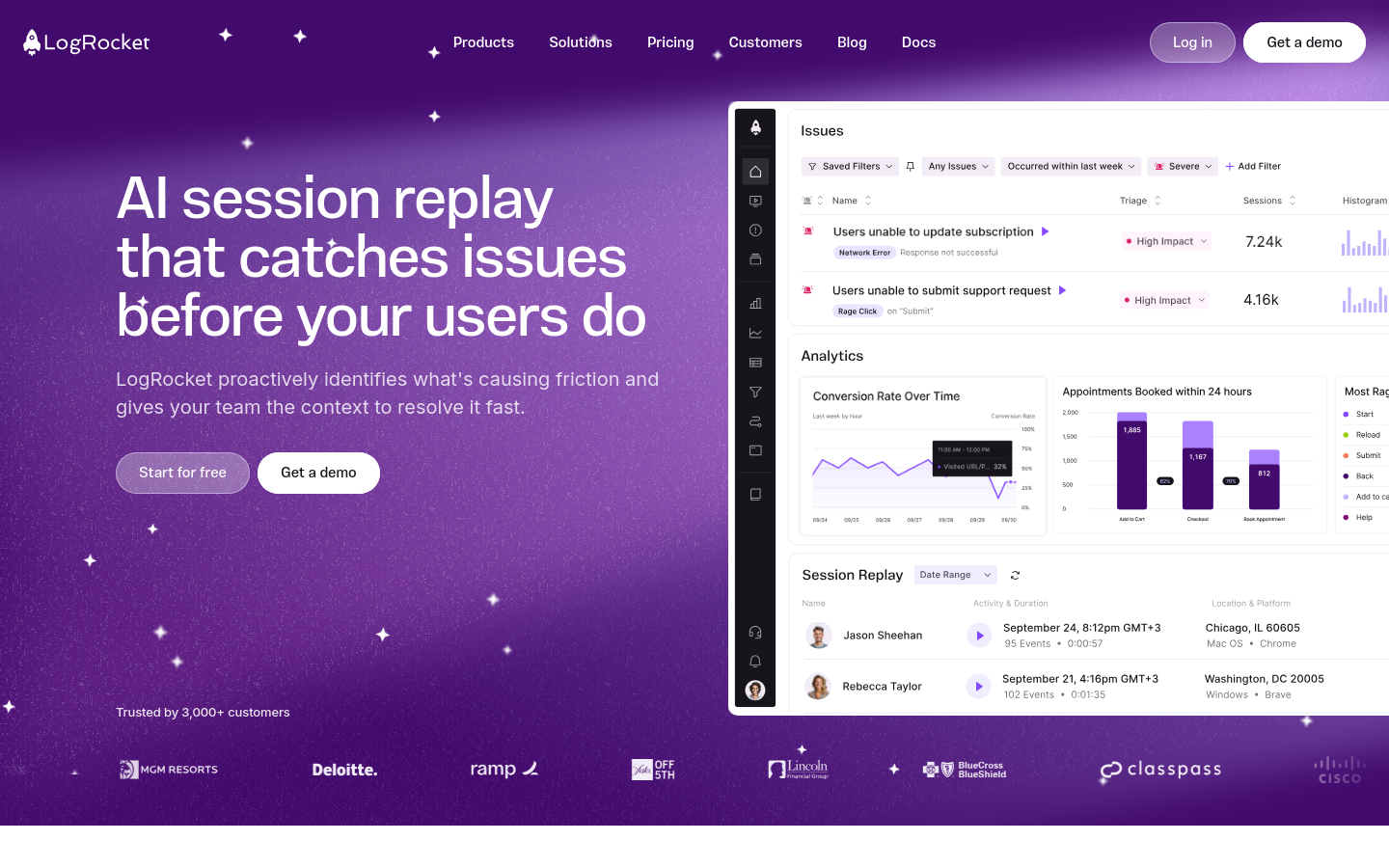
LogRocket is a comprehensive frontend observability platform that combines session replay, product analytics, and error tracking to provide deep visibility into user experiences. Unlike traditional logging tools that provide fragmented data, LogRocket captures the full DOM state, network logs, and console output, allowing developers to watch exact video-like reproductions of user sessions. Its core differentiator is 'Galileo AI,' which proactively surfaces high-impact technical and UX issues, reducing MTTR (Mean Time To Resolution) by automatically generating reproduction steps for complex bugs. It is an essential tool for frontend engineers, product managers, and UX researchers who need to correlate quantitative performance metrics with qualitative user behavior.
LogRocket 's Core features
High-Fidelity Session Replay
LogRocket records the DOM, CSS, and network requests to reconstruct a pixel-perfect video of the user's session. Unlike simple screen recording, it captures the underlying state, allowing developers to inspect the console logs, Redux state, and network payloads at any specific millisecond of the user's journey, making it significantly more effective for debugging complex frontend state issues than traditional log-based monitoring.
Galileo AI Issue Detection
Galileo AI continuously monitors session data to identify patterns of user struggle, such as rage clicks, dead clicks, or recurring JavaScript errors. It automatically clusters these issues by severity and impact, providing developers with a prioritized list of bugs. This reduces the noise of thousands of logs, allowing teams to focus on the 5% of errors that actually impact conversion rates and user retention.
Frontend Performance Monitoring
Provides granular telemetry on Core Web Vitals, including LCP, FID, and CLS. By correlating these performance metrics with specific user sessions, teams can identify exactly which network request or heavy component is causing latency. It allows for the creation of custom dashboards to track performance regressions over time, ensuring that frontend updates do not degrade the user experience.
Product Analytics Funnels
Enables the construction of conversion funnels and path analysis to understand where users drop off in a workflow. By integrating quantitative funnel data with qualitative session replays, product managers can see exactly why users abandon a checkout or signup flow. This combination of 'what' (the funnel drop-off) and 'why' (the session replay) is critical for data-driven product optimization.
Error Tracking and Correlation
Automatically captures unhandled exceptions and network failures. Each error is linked to a session replay, allowing developers to see the exact state of the application leading up to a crash. This eliminates the 'cannot reproduce' cycle, as developers have access to the full context, including user inputs, browser environment, and API responses, immediately upon receiving an error alert.
How to use LogRocket
- Sign up for a LogRocket account and create a new project to generate your unique App ID.,2. Install the SDK via npm or yarn using 'npm install logrocket' or 'yarn add logrocket'.,3. Initialize the SDK in your application's entry point (e.g., index.js) using 'LogRocket.init("your-app-id")'.,4. Configure middleware or plugins to automatically capture Redux actions, Vuex mutations, or Apollo Client network requests.,5. Deploy your application and navigate to the LogRocket dashboard to view real-time session replays and error reports.,6. Use the Galileo AI dashboard to filter for high-severity issues and view automated reproduction steps for reported crashes.
Use cases of LogRocket
Debugging Complex Frontend Crashes
Frontend engineers use LogRocket to resolve intermittent bugs that are hard to reproduce. By viewing the exact console logs and state changes leading to a crash, they can identify race conditions or state management errors that would otherwise take hours to isolate.
Optimizing Conversion Funnels
Product managers analyze drop-off points in checkout flows. By filtering sessions that failed to convert, they can watch replays to identify UI friction, such as confusing form validation or unresponsive buttons, and implement targeted UX improvements.
Improving Customer Support Efficiency
Support teams use LogRocket to view the exact steps a customer took before reporting an issue. This provides immediate context, allowing support agents to resolve tickets faster without needing to ask the user for screenshots or detailed reproduction steps.
Who benefits from LogRocket
Frontend Engineers
Need to debug complex UI state and performance issues. LogRocket provides the technical depth (DOM, network, console) required to fix bugs that standard error trackers cannot diagnose.
Product Managers
Need to understand user behavior and conversion blockers. They use LogRocket to bridge the gap between quantitative analytics and qualitative user experience to prioritize the product roadmap.
UX Designers
Need to validate design decisions and identify usability friction. They use session replays to observe how real users interact with new features, ensuring the design meets accessibility and usability standards.
Pricing of LogRocket
Free tier available for small apps. Paid plans start at $99/mo for Team, with custom Enterprise pricing for advanced security and volume.