Tolaria
A local-first Markdown note-taking app with native Git and AI integration.
Verdict
Best for Knowledge management for developers
Tolaria is a sophisticated, local first knowledge management tool built for those who treat their notes as a serious, long term asset
Best for
Software engineers
Knowledge workers
Key Features
Local-first Markdown storage
Integrated Git version control
Claude Code and MCP support
Actions
Share
Tolaria Screenshots & Demo
What is Tolaria
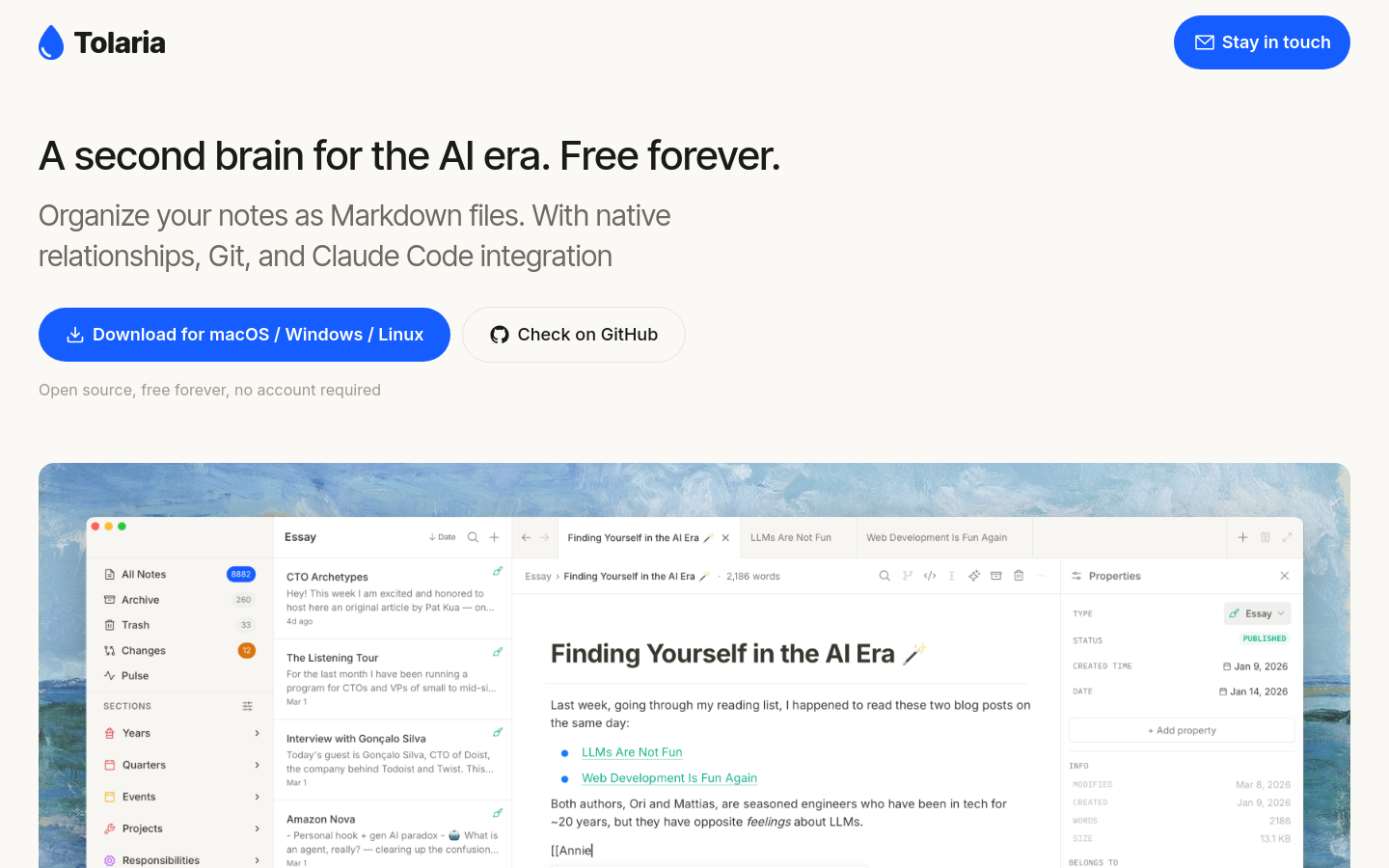
Tolaria is a sophisticated, local-first knowledge management tool built for those who treat their notes as a serious, long-term asset. By storing every entry as a standard Markdown file with YAML frontmatter directly on your disk, it eliminates the risk of proprietary lock-in. This is a tool designed for users who want a 'second brain' that remains accessible, portable, and fully under their control. Unlike cloud-heavy alternatives, Tolaria treats your data like code, providing a robust foundation for building a personal knowledge base that lasts. What sets Tolaria apart is its technical depth. It integrates a native Git client, allowing you to commit, push, and track the history of your notes without leaving the application. For developers and technical writers, this means your documentation workflow is finally unified with your note-taking. Furthermore, the inclusion of a built-in Model Context Protocol (MCP) server bridges the gap between your local files and modern AI workflows. By connecting to tools like Claude Code, you can turn your static notes into an interactive, AI-ready knowledge repository. It is a clean, keyboard-first environment that prioritizes data ownership and technical integration over flashy, closed-source features.
Tolaria 's Core features
Local-first Markdown storage
By saving every note as a plain Markdown file with YAML frontmatter, Tolaria ensures your data remains yours forever, free from the constraints of proprietary formats or hidden database structures.
Integrated Git version control
Manage your note history directly within the interface by committing and pushing changes, providing a professional-grade way to track edits and sync your knowledge base across multiple devices.
Claude Code and MCP support
The app exposes a full Model Context Protocol (MCP) server, allowing you to bridge your local notes with AI coding assistants like Claude Code for smarter, context-aware research and writing.
Rich block-based editor
Experience a keyboard-first writing environment that supports slash commands, wikilinks, and image embedding, all while maintaining clean, standard Markdown files on your local machine.
How to use Tolaria
- Download and install the Tolaria application for macOS, Windows, or Linux to establish a secure, local environment for your knowledge base.
- Begin creating notes using the block-based editor, which automatically saves your work as standard Markdown files with YAML frontmatter on your local drive.
- Structure your information by utilizing wikilinks and drag-and-drop organization to build a cohesive, interconnected second brain without relying on proprietary databases.
- Manage your document history by using the integrated Git client to commit and push changes, ensuring you have a reliable version history for every note.
- Connect your notes to external AI workflows by enabling the built-in MCP server, which allows CLI tools like Claude Code to read and interact with your local files.
Use cases of Tolaria
Knowledge management for developers
Software engineers can maintain a massive library of technical documentation and snippets that remains version-controlled and easily accessible via terminal-based tools.
AI-assisted research and writing
Users can leverage the MCP server to connect their personal knowledge base to AI agents, enabling them to query, summarize, and synthesize information across their entire note collection.
Who benefits from Tolaria
Software engineers
Engineers who prefer managing documentation as code, value Git-based versioning, and want to integrate their personal notes with AI-powered CLI tools.
Knowledge workers
Individuals who require a robust, long-term second brain that avoids proprietary lock-in and keeps data stored as accessible, plain-text files.
Pricing of Tolaria
Free forever, no account required.